This page requires JavaScript to display.
Host a Pod
Unpacking...
\n\n\n\n
\n
\n \"\"Pods Offline\n \n \n
\n
\n\n\n
\n
\n

Home/Host a pod

\n\n
The manual · Your first pod, screen by screen
\n\n

\n How to host
\n your first pod.\n

\n\n

\n A pod is any small, real-world plan you bring people together for — a morning run, a supper, a\n sketch night, a reading hour in the park. Here's the whole thing, from tapping the plus button\n to your pod going live, in five steps. No application, no waiting.\n

\n\n \n
\n
\n\n
\n\n\n
\n
\n\n \n
\n
\n
01 / 05
\n

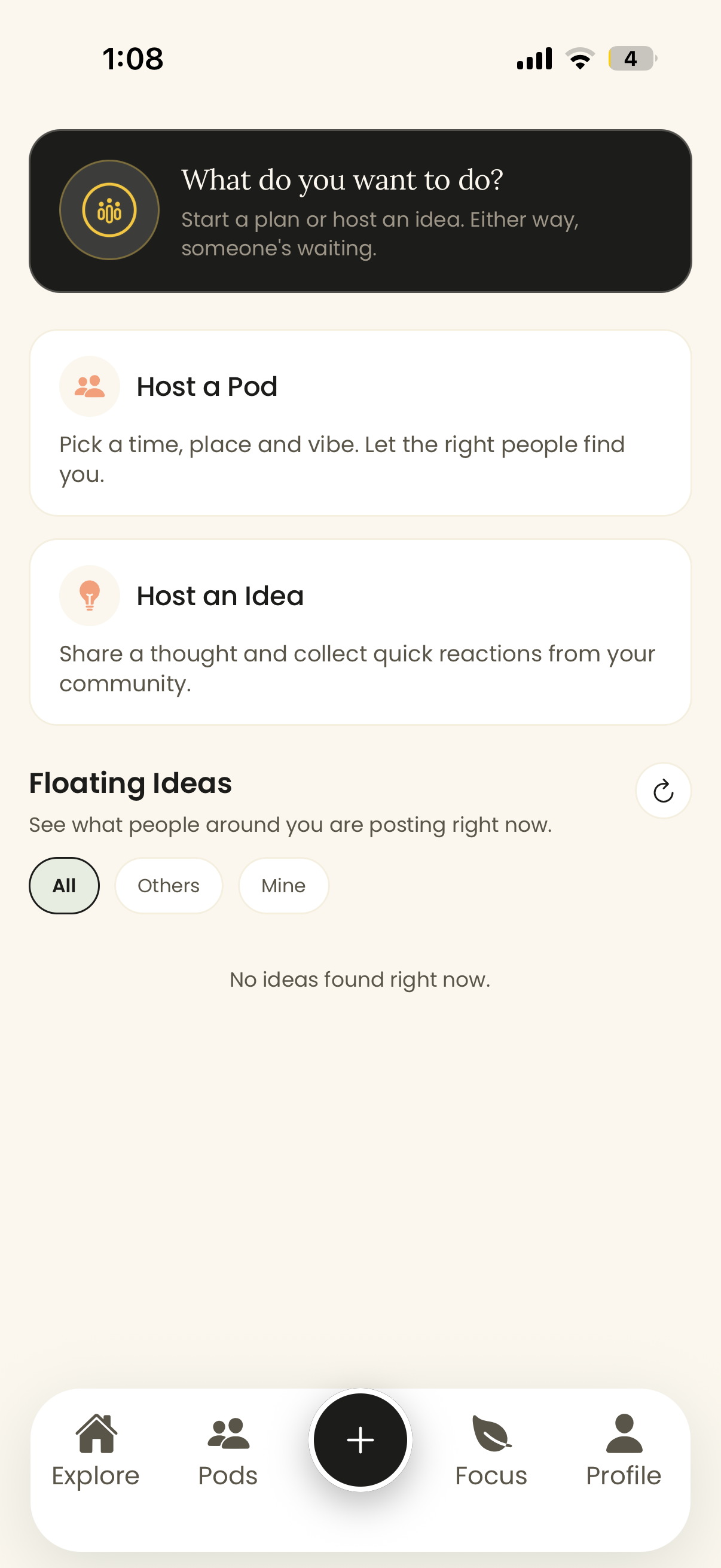
Tap the plus, choose Host a Pod.

\n

\n Open Pods Offline and tap the black + button in the centre of the bottom\n bar. You'll be asked what you want to do. Pick Host a Pod — that's a real\n plan with a time, place, and vibe that the right people can find and join.\n

\n
    \n
  • Host a Pod — a real-world plan people RSVP to and show up for.
  • \n
  • Host an Idea — float a thought first and collect quick reactions before you commit. Great for testing demand.
  • \n
  • Not sure yet? Scroll Floating Ideas to see what people around you are already posting.
  • \n
\n
\n
\n
\n \"Pods\n
\n
\n
\n\n \n
\n
\n
02 / 05
\n

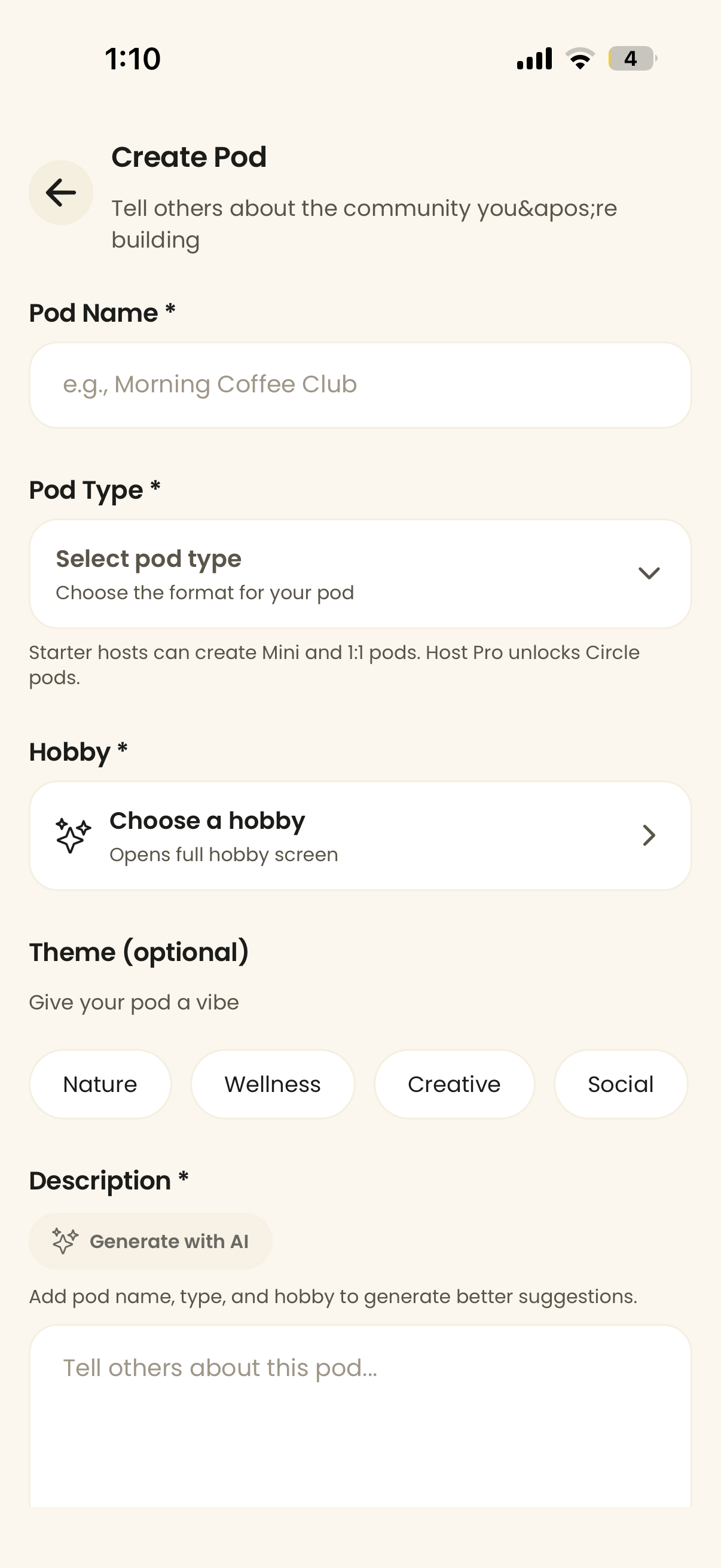
Name it, and give it a vibe.

\n

\n This is where your pod gets its character. Give it a name people will recognise, pick the\n format and the activity, and tell people what to expect. The clearer you are here, the\n better the right people can find you.\n

\n
    \n
  • Pod Name — keep it human. \"Morning Coffee Club\" beats \"Meetup #1\".
  • \n
  • Pod Type — choose the format (Mini, 1:1, and more).
  • \n
  • Hobby — the activity at the centre of it all.
  • \n
  • Theme — optional vibe: Nature, Wellness, Creative, Social.
  • \n
  • Description — write your own, or tap Generate with AI once you've added a name, type, and hobby.
  • \n
\n
\n
\n
\n \"Pods\n
\n
\n
\n\n \n
\n
\n
03 / 05
\n

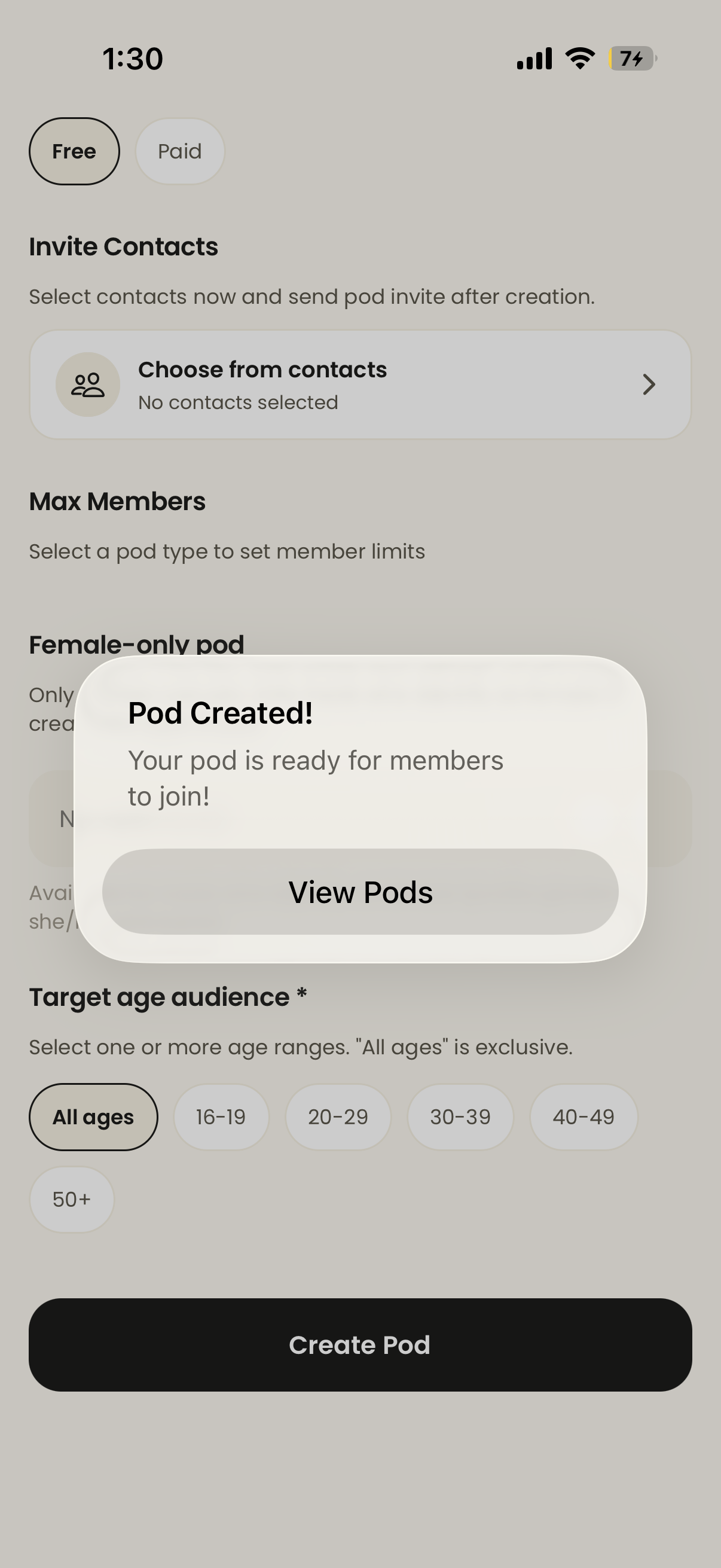
Decide who can join.

\n

\n Scroll down to set the rules of your room. This is what keeps a pod feeling intentional\n instead of a free-for-all — you choose who it's for and how big it gets.\n

\n
    \n
  • Free / Paid — keep it free, or set a fee to cover costs like ingredients or a venue.
  • \n
  • Invite Contacts — line up people now; the invite sends once your pod is created.
  • \n
  • Max Members — cap the size so it stays the right kind of small.
  • \n
  • Female-only pod — an optional toggle for women-only spaces.
  • \n
  • Target age audience — pick one or more ranges, or \"All ages\".
  • \n
\n
\n
\n
\n \"Pods\n
\n
\n
\n\n \n
\n
\n
04 / 05
\n

Hit Create Pod.

\n

\n When everything looks right, tap the big black Create Pod button at the\n bottom. You'll get a \"Pod Created!\" confirmation — your pod is live and\n ready for members to join. Tap View Pods to see it.\n

\n
    \n
  • That's it — no review queue, no approval wait. Your pod is discoverable right away.
  • \n
  • If you lined up contacts in the last step, their invites go out now.
  • \n
\n
\n
\n
\n \"The\n
\n
\n
\n\n \n
\n
\n
05 / 05
\n

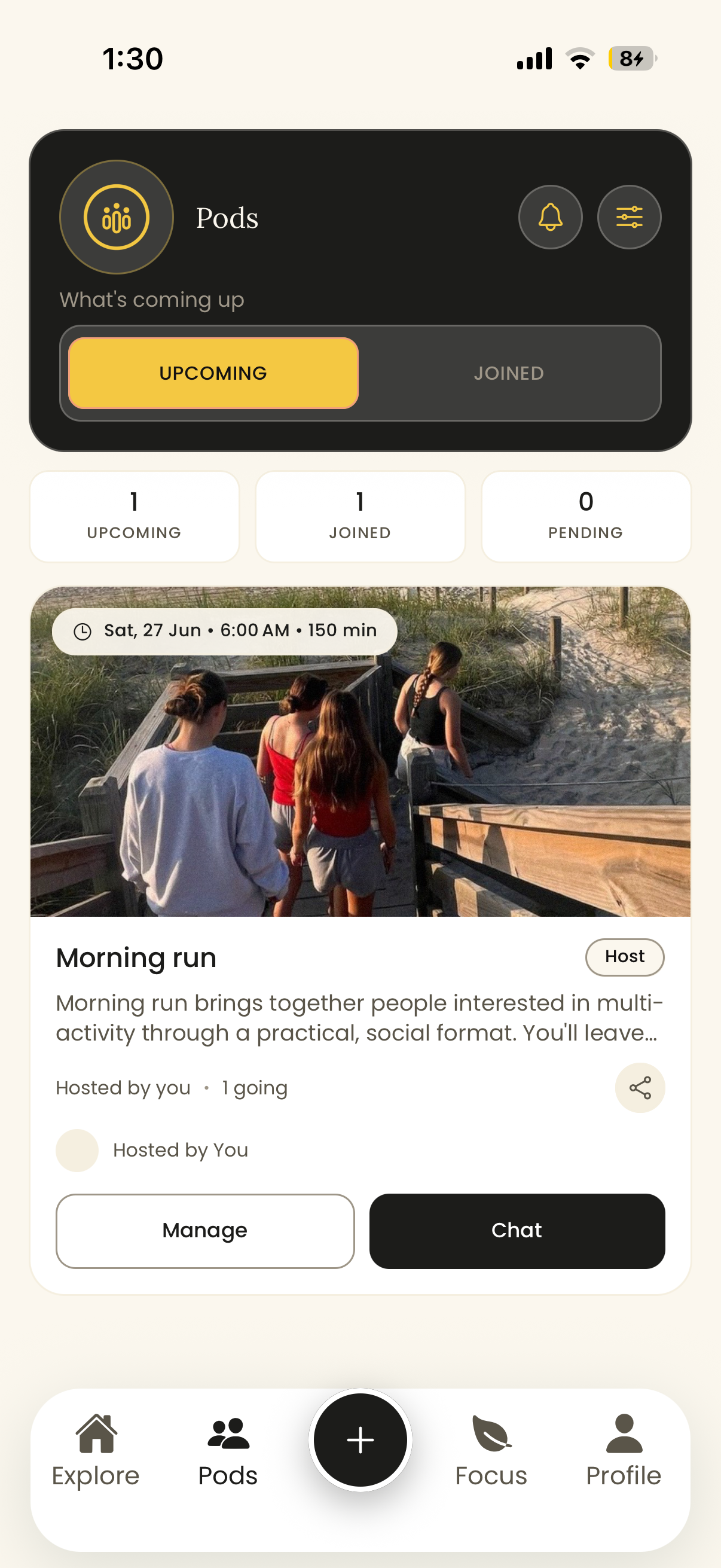
Manage it, and show up.

\n

\n Your pod now lives in the Pods tab. From here you can see who's coming,\n manage the details, share the link, and chat with members before you all meet in real life.\n The rest is the fun part — opening the door and being there.\n

\n
    \n
  • Upcoming / Joined — track pods you host and pods you've joined in one place.
  • \n
  • Manage — edit the plan, the time, or the cap any time.
  • \n
  • Chat — message everyone before the day so nobody shows up unsure.
  • \n
  • Share — drop your pod link wherever your people already are.
  • \n
\n
\n
\n
\n \"Pods\n
\n
\n
\n\n
\n
\n\n\n
\n
\n
A few things that help
\n

How the best first pods tend to go.

\n\n
\n
\n
🪺
\n

Start small

\n

A first pod of a handful of people is easier to host well than a big one. Cap it low — you can always grow.

\n
\n
\n
🔁
\n

Pick a repeatable thing

\n

The magic isn't one great night — it's the same crew, the same time, the eighth week running. Choose something you'd happily do again.

\n
\n
\n
📍
\n

Be specific

\n

A clear place, a clear time, a clear activity. \"Sunday 7am, Carter Road, easy run + coffee\" beats \"let's hang out sometime\".

\n
\n
\n
💡
\n

Float it first

\n

Not sure people will come? Host it as an Idea and watch the reactions before you lock a date.

\n
\n
\n
💬
\n

Say hi in chat

\n

A quick message the day before turns nervous strangers into people who actually show up.

\n
\n
\n
\n

Leave room to linger

\n

Plan a little time after the main thing — a coffee, a chai. That's usually where the pod becomes a pod.

\n
\n
\n
\n
\n\n\n
\n
\n
First-time hosts ask
\n

Quick questions.

\n\n
\n
\n Do I need to apply to host a pod?\n
No. Hosting is self-serve. Tap the plus, fill in the details, and publish — your pod is live straight away. There's no application, no review queue, and no waiting.
\n
\n
\n What's the difference between a Pod and an Idea?\n
A Pod is a real plan with a time and place that people RSVP to. An Idea is a thought you float first to gauge interest — people react and signal demand before you commit a date or a venue. Many hosts float an Idea, see it get traction, then turn it into a Pod.
\n
\n
\n Can I make my pod private or invite-only?\n
Yes. You set the access when you create it — invite specific contacts, cap the member count, optionally make it female-only, and choose the target age range. You decide who it's for.
\n
\n
\n Can I charge for my pod?\n
Yes — toggle Paid when you set it up if you need to cover costs like ingredients, materials, or a venue. The price is yours to set and is shown clearly before anyone joins.
\n
\n
\n What happens after I create it?\n
Your pod appears in the Pods tab, where you can manage the details, chat with members, share the link, and see who's coming. Any contacts you invited get their invite automatically.
\n
\n
\n
\n
\n\n\n
\n
\n
Ready to host?
\n

Your first pod is
five taps away.

\n

\n Download Pods Offline, tap the plus, and bring your first plan to life.\n

\n \n
\n
\n\n\n\n\n\n\n"